
- September 10, 2021
- By Nick Whitt
- 5 min read
Docker In AWS Lambda
How Docker support in AWS Lambda reduces deployment overhead and allows previously unsupported runtime dependencies for serverless solutions.
DOCKER SUPPORT IN LAMBDA
Overview
In short
- AWS Lambda now supports Docker containers, reducing deployment overhead and allowing previously unsupported runtime dependencies like C-extension libraries.
- Traditional deployment packages require manual steps to archive dependencies, and C-extension libraries like NumPy fail in the standard Lambda python runtime.
- Container image deployment uses AWS base images and the runtime interface emulator for local testing, then deploys via Amazon ECR for production use.
AWS Lambda allows developers to deploy Serverless solutions, but application dependencies can sometimes be cumbersome to package. AWS has recently introduced support for those who employ Docker container-based development strategies in their workflow. This can not only reduce the overhead involved with traditional deployment packaging but also allow for previously unsupported runtime dependencies to be employed.
The article will highlight this updated container support - the example project below provides the times when the International Space Station will rise above and set below the horizon for the next 24 hours. To keep this example simple, we will hard-code orbital data for the ISS (as of Feb 4, 2021), and assume the observer is located at Cape Canaveral Space Force Station.
from datetime import datetime, timedelta

import pytz
from skyfield.api import EarthSatellite, load, wgs84


def handler(event, context):
    ccsfs = wgs84.latlon(+28.4889, -80.5778)
    tz = pytz.timezone("US/Eastern")

    satellite = EarthSatellite(
        "1 25544U 98067A   21034.93850296  .00000995  00000-0  26262-4 0  9997",
        "2 25544  51.6455 281.7841 0002223 334.9147 115.4374 15.48938034267947",
    )

    position = satellite - ccsfs

    now = datetime.now(pytz.utc)
    t = load.timescale().from_datetimes([now, now + timedelta(hours=24)])

    t, events = satellite.find_events(ccsfs, *t)
    for ti, event in zip(t, events):
        alt, az, distance = position.at(ti).altaz()
        print(
            ti.astimezone(tz).strftime("%Y-%m-%d %H:%M:%S %Z"),
            ("rises", "culminates", "sets")[event],
            alt if alt.degrees > 1 else "",
        )


if __name__ == "__main__":
    handler(None, None)
The code calculates how many times the satellite rises above the horizon over the span of a single day. For each such event, our program will print the time it rises, the moment and altitude of greatest ascent, and the time it sets.
2021-02-07 17:37:12 EST rises
2021-02-07 17:41:56 EST culminates 13deg 57' 59.5"
2021-02-07 17:46:40 EST sets
2021-02-07 19:13:31 EST rises
2021-02-07 19:18:53 EST culminates 41deg 07' 40.6"
2021-02-07 19:24:13 EST sets
2021-02-08 08:40:04 EST rises
2021-02-08 08:44:09 EST culminates 08deg 43' 02.6"
2021-02-08 08:48:17 EST sets
2021-02-08 10:15:12 EST rises
2021-02-08 10:20:34 EST culminates 50deg 18' 24.1"
2021-02-08 10:25:59 EST sets
2021-02-08 11:54:26 EST rises
2021-02-08 11:58:01 EST culminates 05deg 23' 08.6"
2021-02-08 12:01:36 EST sets
Our local development will include a simple Dockerfile in addition to a docker-compose.yml file and requirements.txt file.
FROM python:3.8
WORKDIR /usr/src/app
COPY requirements.txt ./
RUN pip install --no-cache-dir -r requirements.txt
COPY . .
CMD ["python", "./app.py"]
version: "3.9"
services:
  web:
    build: .
    volumes:
      - .:/usr/src/app
pytz
skyfield
Traditional Deployment Package
To deploy a Lambda function, we must create a deployment package consisting of all code dependencies, in addition to the code itself. This isn’t a difficult process but involves manual steps that are not otherwise required in our container-based environment. We can use our existing requirements.txt file to set up a virtual environment and `pip install` our dependencies as usual.
$ python3 -m venv venv
$ source venv/bin/activate
(venv)$ pip install -r requirements.txt
Our libraries are now located within the `site-packages` directory of our virtual environment. These need to be archived alongside our lambda function to create the deployment package.
$ cd venv/lib/python3.9/site-packages
$ zip -r ../../../../app.zip .
$ cd ../../../../
$ zip -g app.zip app.py
If we were to use this .zip file as our Lambda function, we would get the following error in production: Importing the NumPy C-extensions failed.
If you look closely, you’ll notice that our virtual environment was created using the locally installed python version: 3.9. Our Dockerfile is set to the AWS supported runtime of python:3.8, but is not used with python’s virtual environment. We could assume this to be the cause of our production error, but the error will persist even after resolving local and production environment discrepancies. Unfortunately, C-extension libraries (such as NumPy) are not supported by the AWS Lambda python runtime.
Container Image Deployment
As the local environment already supports Docker containers, it would be much more convenient to have our deployment process use the same tools. AWS provides base images for all supported Lambda runtime environments. This allows us to locally test our lambda function, invoking it directly through the runtime interface emulator.
With our Dockerfile updated as follows:
FROM public.ecr.aws/lambda/python:3.8
COPY requirements.txt ./
RUN pip install --no-cache-dir -r requirements.txt
COPY . .
CMD ["app.handler"]
We can now test with a local container:
$ docker build -t app:latest .
$ docker run -p 9000:8080 app:latest

$ curl -XPOST "http://localhost:9000/2015-03-31/functions/function/invocations" -d '{}'
The runtime interface emulator invoked through the /2015-03-31/functions/function/invocations endpoint, acts as a local proxy for Lambda’s Runtime API. The lambda handler specified in the updated Dockerfile will receive event and context data, just as in production.
Here are the results from a local test invocation:
START RequestId: 00ca084f-159f-46ec-9d69-9c638573e081 Version: $LATEST
2021-02-07 17:37:12 EST rises
2021-02-07 17:41:56 EST culminates 13deg 57' 59.5"
2021-02-07 17:46:40 EST sets
2021-02-07 19:13:31 EST rises
2021-02-07 19:18:52 EST culminates 41deg 07' 40.8"
2021-02-07 19:24:13 EST sets
2021-02-08 08:40:04 EST rises
2021-02-08 08:44:10 EST culminates 08deg 43' 02.6"
2021-02-08 08:48:17 EST sets
2021-02-08 10:15:12 EST rises
2021-02-08 10:20:34 EST culminates 50deg 18' 24.2"
2021-02-08 10:25:59 EST sets
2021-02-08 11:54:26 EST rises
2021-02-08 11:58:01 EST culminates 05deg 23' 08.6"
2021-02-08 12:01:36 EST sets
END RequestId: 00ca084f-159f-46ec-9d69-9c638573e081
REPORT RequestId: 00ca084f-159f-46ec-9d69-9c638573e081	Init Duration: 0.27 ms	Duration: 160.37 ms	Billed Duration: 200 ms	Memory Size: 3008 MB	Max Memory Used: 3008 MB
For our lambda function to use the container, we must deploy the image to Amazon ECR using docker push.
$ docker tag  app:latest 123456789012.dkr.ecr.us-east-1.amazonaws.com/app:latest
$ docker push 123456789012.dkr.ecr.us-east-1.amazonaws.com/app:latest
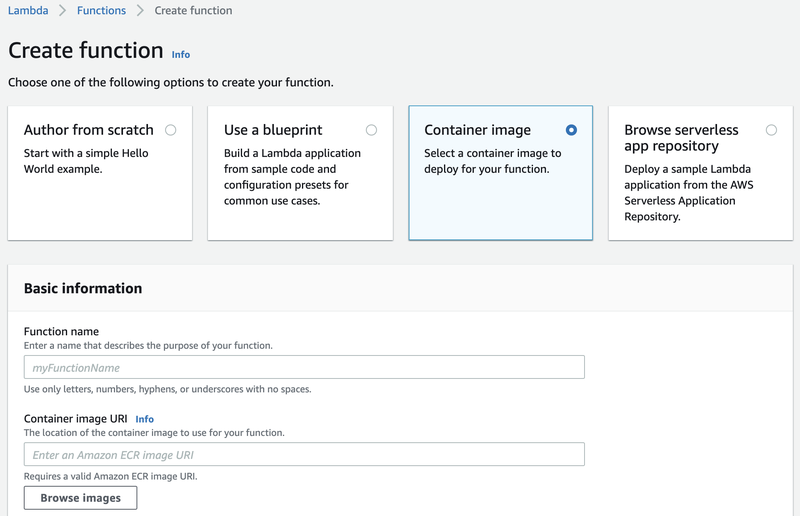
Now, when you create a function in the Lambda console, you will have the option to enter your new container image URI as the base image.
Custom Base Image
In addition to AWS base images, you can also update an existing Linux image to support Lambda container deployment. The Lambda Runtime Interface Client must be added to the Dockerfile.
RUN pip install awslambdaric
ENTRYPOINT ["/usr/local/bin/python", "-m", "awslambdaric"]
Optionally, you can install the runtime interface emulator to allow for local testing with docker-compose.
$ mkdir -p ~/.aws-lambda-rie
$ curl -Lo ~/.aws-lambda-rie/aws-lambda-rie https://github.com/aws/aws-lambda-runtime-interface-emulator/releases/latest/download/aws-lambda-rie
$ chmod +x ~/.aws-lambda-rie/aws-lambda-rie
version: "3.9"
services:
  web:
    build: .
    entrypoint: /aws-lambda/aws-lambda-rie
    command: /usr/local/bin/python -m awslambdaric app.handler
    volumes:
      - ~/.aws-lambda-rie:/aws-lambda
      - .:/usr/src/app
    ports:
      - 9000:8080
KEEP READING
Related Resources
Guide
eCommerce Platforming Showdown: Saas vs On-Premise
SaaS and on-premise ecommerce platforms compared on cost, integration, customization, scale, upkeep, PCI compliance, and time to launch.
Get the white paper
Case Study
Finishing a Data Warehouse for a Global Testing Organization
A new query API lets non-IT staff serve themselves, and Java build times fell from about 46 minutes to 56 seconds.
Read the testing organization case study
Case Study
Analytics Dashboard MVP for Noodle Partners
JBS Dev delivered a working dashboard MVP on AWS in the planned three months and is building it into a full analytics platform.
Read the Noodle Partners case study
